 Harajuku clothing style involves mixing and (mis) matching different fashions and styles. Harajuku fashion changes and evolves constantly, sometimes mixing traditional Japanese clothing such as kimonos and geta sandals with other styles. Everything from punk, goth to designer clothes can be mixed and mismatched with colorful accessories to create a unique and individual style. Harajuku clothing style involves mixing and (mis) matching different fashions and styles. Harajuku fashion changes and evolves constantly, sometimes mixing traditional Japanese clothing such as kimonos and geta sandals with other styles. Everything from punk, goth to designer clothes can be mixed and mismatched with colorful accessories to create a unique and individual style.
Although more recently brand loyalty has become more prominent, second hand clothing and do it yourself are the basis of harajuku fashion. Maybe a flowered skirt with a pinned ribbon attached with a more angular hemline? If you have some talent then grab your scissors and sewing kit and make your store clothes individually yours..
| |

Look and learn. look at pictures of the harajuku fashion scene and get inspiration from them. steal ideas from here and there to get the look that works for you. You may also want to buy 'fruits' and 'fresh fruits' magazine along with the Gothic Lolita Bible, these are all great sources of inspiration.
Dress in layers. One of the characteristics of Harajuku fashion is layering. Lair sweaters, jackets and vests over blouses and over tshirts. Dresses may be worn with leggings, and so on. Layering - or giving the impression of layered clothes by wearing ruffled dresses etc. allows you to get away with more of a variety of styles, and adds an additional dimension to your outfit.
Accessorize. add extravagant accessories including earrings, jewelry, belts, hair clips, handbags. When dressing decora style especially loud and colorful is the key, embellish your outfit from head to toe with pink, yellow, green, purple accessories that stand out.
Go wild with makeup and hairstyle. Harajuku style does not necessarily end with what you wear. Adding a a crazy hairstyle or a cute hairstyle - maybe sporting cute pigtails can complete your image along with using hair dye and making yourself up with theatrical makeup.
Wear whatever looks suits you. unlike punk rock harajuku fashion is not just about rebelling about mainstream fashion, but more a way of wearing what looks good on you. If you have a desire to wear pink and white striped leggings with a green plaid dress then do it!
| |
Showing posts with label design. Show all posts
Showing posts with label design. Show all posts
Friday, April 17, 2009
Dress harajuku Style's
Kawaii & Decora japanese style
  Kawaii means "cute" or "pretty. has become a major aspect of Japanese culture, entertainment, food, clothing, toys, personal appearance and behavior. Kawaii fashion generally relates to someone wearing clothing that appears to be made for young children or clothes that accentuates the cuteness of the individual wearing the clothing. Ruffles and pastel or bright colors may be worn, and accessories often include oversize toys or bags featuring anime characters. Kawaii means "cute" or "pretty. has become a major aspect of Japanese culture, entertainment, food, clothing, toys, personal appearance and behavior. Kawaii fashion generally relates to someone wearing clothing that appears to be made for young children or clothes that accentuates the cuteness of the individual wearing the clothing. Ruffles and pastel or bright colors may be worn, and accessories often include oversize toys or bags featuring anime characters. | |
 | |
Sunday, April 12, 2009
Harajuku Fashion & Hair Style 2009
"With your underground malls in the world of Harajuku
Putting on a show, when you dress up in your clothes
Wild hair color and cell phones
Your accessories are dead on"
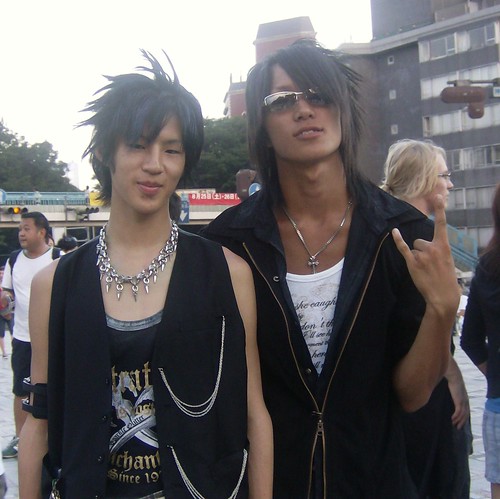
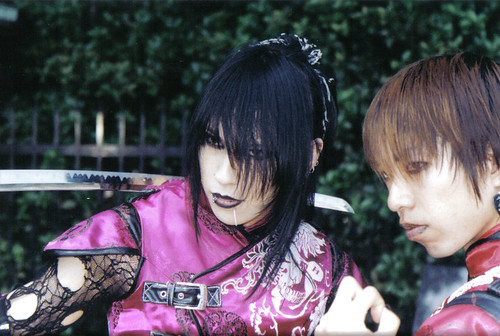
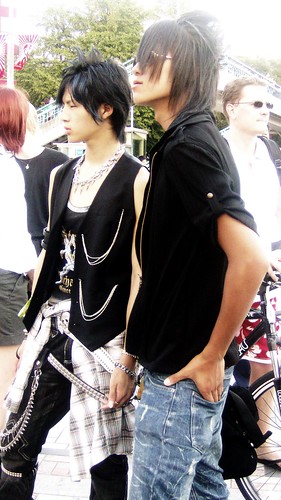
That's the lyric from Gwen Stefani song entitled Harajuku Girls. The song expresses her admiration on Harajuku style. Harajuku is an area around Tokyo's Harajuku Station. This area is the center of boys and girls fashion style and internationally well known for its cultures. They usually wear fashionably unique clothes. Ranging from gothic style, hip hop, punk, to the style of anime character. The specialty of Harajuku style lies on its glamorous beads, harmonizing dark and bright theme, and melting the feminine and masculine element, both from its style as well as the function. The style is actually divided into various styles such as Lolita, Kogal, Gongaru, Cosplay (costume play), Yamanba, and many more.
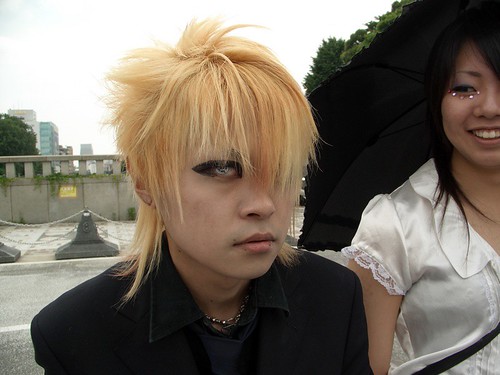
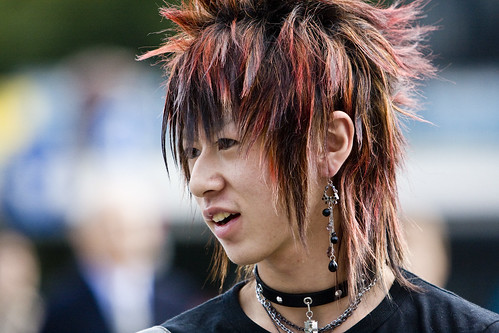
The extreme costume from Harajuku is also supported by the extreme of make up and hairstyle. The Harajuku hair style is actually extreme, glamorous, and eye catching. To apply harajuku hair, you should razor your hair, make it wild, let the hair down, & dye your hair (usually with bright color) like the pictures below.
Putting on a show, when you dress up in your clothes
Wild hair color and cell phones
Your accessories are dead on"
That's the lyric from Gwen Stefani song entitled Harajuku Girls. The song expresses her admiration on Harajuku style. Harajuku is an area around Tokyo's Harajuku Station. This area is the center of boys and girls fashion style and internationally well known for its cultures. They usually wear fashionably unique clothes. Ranging from gothic style, hip hop, punk, to the style of anime character. The specialty of Harajuku style lies on its glamorous beads, harmonizing dark and bright theme, and melting the feminine and masculine element, both from its style as well as the function. The style is actually divided into various styles such as Lolita, Kogal, Gongaru, Cosplay (costume play), Yamanba, and many more.
The extreme costume from Harajuku is also supported by the extreme of make up and hairstyle. The Harajuku hair style is actually extreme, glamorous, and eye catching. To apply harajuku hair, you should razor your hair, make it wild, let the hair down, & dye your hair (usually with bright color) like the pictures below.





Fashion Trends 2009 ?
uhh i dont think this is what youll see in 2009... or at least, i hope not. half of these things are absoloutley hideous. the squared toed, thick clunky shoes? the belly showing? seriously??! if this is what we should expect for 2009, then we might as well climb into a trash can, cuz these are horrible trends. Mayb u should do more research on what people will actually like... because i asked tons of people i know, and they think the fashion rate is a 2 out of 5.
Japan Harajuku girls ( February 2009 )
The "volume" look made its debut in the 1960s and made a major comeback in the 1980s, when fan-shaped mini skirts and other shapely items were unveiled by Yves Saint Laurent, Christian Lacroix, and other foreign designers. In Japan, balloon skirts, blouses with puffy sleeves, and other oversized clothing caught on in the latter half of the 1980s after young Olive magazine readers began wearing them and the "cute and coquettish" look took hold.
Balloon skirts are in vogue. (Laisse Passe Co., Ltd.)
Today, two more decades down the line, volume fashion is again back in vogue, while the preference dating back to the 1990s for casual and compact styles, with excess kept to a minimum, seems to have passed its peak.
This time, however, variety is the name of the game, with voluminous tops often being mixed with leaner bottoms and vice versa, rather than full head-to-toe volume. By wearing a balloon skirt with a high-necked collar knit or short jacket, or a puffy sleeved blouse or cocoon silhouette top with skinny jeans, leggings, or other tight-fitting pants, a clean, sharp look is achieved
Thursday, April 9, 2009
Animasi mudah dan sederhana dengan Photoshop CS3
yukkk.. belajar bersama bikin animasi pake photohop cs3
langsung aja ya.. cOii..
Kita bikin Gambar animasi sederhana seperti :

1. Buat sebuah dokumen baru berukuan sedang, 300x250 px dengan latar belakang putih saya rasa sudah cukup memadai.

2. Gunakan Ellipse tool untuk membuat objek lingkaran kecil berwarna hitam. Pastikan Anda menggunakan pilihan shape layers, sehingga objek lingkaran tersebut dibuat pada layer shape baru. ( Klik pada gambar untuk memperbesar ukurannya - pada jendela browser baru)

3. Buat tiga buah objek lingkaran lagi dengan ukuran yang sama satu sama lainnya. Bila tidak ingin repot, cukup gandakan saja objek lingkaran tersebut dengan menekan Ctrl+J lalu susun horisontal seperti yang terlihat pada Gambar dibawah ini:

4. Buat sebuah objek lingkaran lagi dengan ukuran yang sama, namun gunakan warna merah. Pastikan objek lingkaran ini berada di urutan teratas pada palet Layers lalu sembunyikan layer ini dengan menghilangkan icon mata di sebelahnya.

5. Tampilkan palet Animation melalui menu Window> Animation. di sini Anda hanya melihat sebuah frame.
Ingat, Untuk membuat animasi, Anda harus menambah jumlah frame dan melakukan perubahan yang diperlukan dalam tiap-tiap frame tersebut.

6. Untuk itu, klik tombol Duplicates Selected Frames ( tombol ini sudah mendefinisikan sendiri fungsinya bukan ? ) Frame hasil duplikat ini dinamai Frame 2. Berikutnya apabila Anda mengulang langkah ini, frame selanjutnya akan diberi nama frame 3, frame 4 dan seterusnya sesuai dengan urutan frame tersebut dibuat. Cukup jelas yah? mudah2an :)
7. Masih pada frame 2, tampilkan kembali objek lingkaran merah.

8. Buat frame 3, lalu pindahkan objek lingkaran merah ke atas lingkaran hitam 2. Lihat gambar untuk lebih jelasnya.

9. Buat frame 4, lalu pindahkan objek lingkaran merah ke atas lingkaran hitam 3.

10. Buat frame 5, lalu pindahkan objek lingkaran merah ke atas lingkaran hitam 4.

11. OK sudah cukup, sekarang coba mainkan animasi dengan mengklik tombol play.
12. Bila gerakan animasi dirasa terlalu cepat, Anda dapat mengatur jarak tayang ( delay ) antar frame. untuk mengatur delay seluruh frame, seleksi seluruh frame terlebih dahulu melalui tombol menu, pilih Select All Frames.

13. Kemudian klik salah satu tulisan 0 sec yang berada dibawah kotak frame, untuk memilih delay time yang diinginkan. Dalam contoh ini saya memilih delay 0.2 sec, artinya jarak waktu
untuk menampilkan tiap-tiap frame adalah 0.2 detik.

14. Klik kembali tombol Play, kini gerakan animasi menjadi sedikit lebih lambat.
15. Untuk menjadikan gambar ini sebagai animasi, Anda harus menyimpannya ke dalam format GIF. Klik menu File> Save for web and Devices atau Save Optimize image ( kalau nggak salah ) untuk ImageReady.
16. Dalam kotak dialog yang tampil, pilih salah satu Preset GIF, misalnya GIF 32 No Dither ( Anda ikuti saja dulu, soalnya terlalu bertele-tele kalau saya jelaskan lagi kenapa pilih Preset ini, atau selanjutnya silahkan dicari sendiri apa dan mengapa ? nah dari situ kita mau belajarkan... :)
17. Pada bagian Looping options, pilih Forever.

18. Klik tombol Save, tentukan lokasi penyimpanan serta nama file. Selesai sudah :) Bila diperlukan untuk lain waktu, jangan lupa untuk menyimpan gambar animasi dalam format PSD juga.
langsung aja ya.. cOii..
Kita bikin Gambar animasi sederhana seperti :
1. Buat sebuah dokumen baru berukuan sedang, 300x250 px dengan latar belakang putih saya rasa sudah cukup memadai.
2. Gunakan Ellipse tool untuk membuat objek lingkaran kecil berwarna hitam. Pastikan Anda menggunakan pilihan shape layers, sehingga objek lingkaran tersebut dibuat pada layer shape baru. ( Klik pada gambar untuk memperbesar ukurannya - pada jendela browser baru)
3. Buat tiga buah objek lingkaran lagi dengan ukuran yang sama satu sama lainnya. Bila tidak ingin repot, cukup gandakan saja objek lingkaran tersebut dengan menekan Ctrl+J lalu susun horisontal seperti yang terlihat pada Gambar dibawah ini:
4. Buat sebuah objek lingkaran lagi dengan ukuran yang sama, namun gunakan warna merah. Pastikan objek lingkaran ini berada di urutan teratas pada palet Layers lalu sembunyikan layer ini dengan menghilangkan icon mata di sebelahnya.
5. Tampilkan palet Animation melalui menu Window> Animation. di sini Anda hanya melihat sebuah frame.
Ingat, Untuk membuat animasi, Anda harus menambah jumlah frame dan melakukan perubahan yang diperlukan dalam tiap-tiap frame tersebut.
6. Untuk itu, klik tombol Duplicates Selected Frames ( tombol ini sudah mendefinisikan sendiri fungsinya bukan ? ) Frame hasil duplikat ini dinamai Frame 2. Berikutnya apabila Anda mengulang langkah ini, frame selanjutnya akan diberi nama frame 3, frame 4 dan seterusnya sesuai dengan urutan frame tersebut dibuat. Cukup jelas yah? mudah2an :)
7. Masih pada frame 2, tampilkan kembali objek lingkaran merah.
8. Buat frame 3, lalu pindahkan objek lingkaran merah ke atas lingkaran hitam 2. Lihat gambar untuk lebih jelasnya.
9. Buat frame 4, lalu pindahkan objek lingkaran merah ke atas lingkaran hitam 3.
10. Buat frame 5, lalu pindahkan objek lingkaran merah ke atas lingkaran hitam 4.
11. OK sudah cukup, sekarang coba mainkan animasi dengan mengklik tombol play.
12. Bila gerakan animasi dirasa terlalu cepat, Anda dapat mengatur jarak tayang ( delay ) antar frame. untuk mengatur delay seluruh frame, seleksi seluruh frame terlebih dahulu melalui tombol menu, pilih Select All Frames.
13. Kemudian klik salah satu tulisan 0 sec yang berada dibawah kotak frame, untuk memilih delay time yang diinginkan. Dalam contoh ini saya memilih delay 0.2 sec, artinya jarak waktu
untuk menampilkan tiap-tiap frame adalah 0.2 detik.
14. Klik kembali tombol Play, kini gerakan animasi menjadi sedikit lebih lambat.
15. Untuk menjadikan gambar ini sebagai animasi, Anda harus menyimpannya ke dalam format GIF. Klik menu File> Save for web and Devices atau Save Optimize image ( kalau nggak salah ) untuk ImageReady.
16. Dalam kotak dialog yang tampil, pilih salah satu Preset GIF, misalnya GIF 32 No Dither ( Anda ikuti saja dulu, soalnya terlalu bertele-tele kalau saya jelaskan lagi kenapa pilih Preset ini, atau selanjutnya silahkan dicari sendiri apa dan mengapa ? nah dari situ kita mau belajarkan... :)
17. Pada bagian Looping options, pilih Forever.
18. Klik tombol Save, tentukan lokasi penyimpanan serta nama file. Selesai sudah :) Bila diperlukan untuk lain waktu, jangan lupa untuk menyimpan gambar animasi dalam format PSD juga.
Thursday, November 20, 2008
Easy Banner Maker / Cara mudah membuat banner
Cara mudah membuat banner untuk web nah berikut ini software nya
- Membuat banner dan animasi GIF-untuk Web
- membuat gambar
- pengembangan kreatif imajinasi

Feature :)
- -Membuat banner animasi dan statis dengan ukuran standar atau apapun
- -Mendefinisikan gaya mengisi latar belakang: Warna, Gradasi, Gambar;
- -Suports paling populer gambar format: BMP, JPEG (JPG), GIF, PNG, PCX, PSD, ICO dan Windows Metafiles
- -Menambahkan, menghapus, swap banner unsur: teks dan gambar (termasuk animasi GIFs)
- -Membangun animasi pada pangkal berjalan beberapa elemen dan efek teks (mengubah warna, mengubah ukuran, dan secara perlahan teletip)
- -Mendefinisikan teks dengan parameter: warna, font, ukuran, bayangan dan kedalaman warna
- -Mendefinisikan gambar parameter: ukuran dan transparan
- -Animasi mendefinisikan parameter untuk menjalankan setiap elemen: arah, interval waktu (mulai dan berhenti nilai dari 0% sampai 100%)
- -Animasi mendefinisikan parameter untuk membuat banner: dihitung dari frame, keterlambatan
- -Optimal ukuran dibuat-file GIF dan ukurannya displayes di Status bar
- -Ekspor dibuat untuk banner-file GIF
- -Menyimpan gambar dari GIF-file sebagai set JPEG atau PNG-file
- -Menyimpan animasi dalam skrip EBC-file.
[download] banner.rar of size (1.4 MB)
enjoy it.. :D
Saturday, October 25, 2008
animasi aplikasi

download here
Untuk cara dan pemakaian XARA 3D. version 6. silahkan hubungi saya atau tanya langsung lewat comment di blog saya
saya akan menjawab sesuai dengan animasi yang pernah aku bikin dengan memakai software tersebut. Hasil dari aplikasi tersebut , bisa anda liat pada logo banner saya .

Aplikasi laen yang sejenis namun lebih okey . dari Xara 3D.6
Xara Xtreme Pro v40.4966
download disini
maaf lum sempat UPLOAD :D
Subscribe to:
Posts (Atom)